
Download ZHPCleaner – Free Security Tool for Windows & Mac | Clean Browser Hijackers & PUPs
Looking for a free, secure, and lightweight security tool to protect your web browsers from adware, hijackers, toolbars, and potentially unwanted programs (PUPs)? ZHPCleaner is the perfect solution. Developed by Nicolas Coolman, this powerful yet simple utility helps you clean unwanted browser extensions, restore proxy settings, and improve system performance without the bloat of expensive antivirus suites. Whether you're using Windows or Mac, ZHPCleaner offers a streamlined experience with no installation required—just download, run, and scan. It’s ideal for users who want a no-nonsense approach to digital hygiene, offering real-time protection against browser-based threats that can slow down your system and compromise your privacy.
Compatible with Windows & Mac – Lightweight, Portable, and Easy to Use
ZHPCleaner is designed with cross-platform compatibility in mind, supporting both Windows 7 through Windows 11 and macOS (with Apple Silicon and Intel support). The software is available as a portable version, meaning you don’t need to install it—just download the ZIP file, extract it, and launch the executable. This makes it incredibly convenient for users who prefer not to clutter their system with permanent software or who use multiple devices. The app runs entirely in memory, minimizing disk usage and ensuring it doesn’t interfere with your system’s startup or background processes.
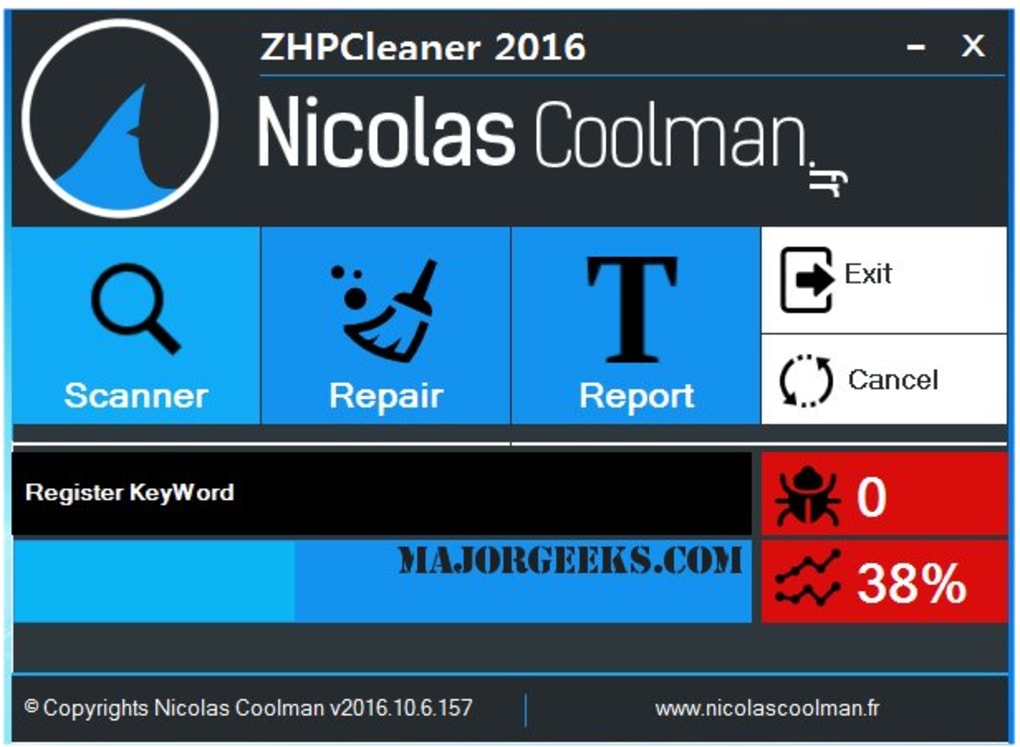
Despite its minimal footprint, ZHPCleaner packs a powerful punch. It integrates seamlessly with your browser environment, scanning for malicious or unwanted components such as rogue extensions, redirecting toolbars, and hidden browser hijackers. The interface is refreshingly simple—only three main buttons: Scanner, Repair, and Report.
This focus on core functionality ensures that even non-technical users can navigate the tool without confusion. The Scanner runs a deep analysis of your system, searching for known PUPs and suspicious entries in the registry and browser profiles. Once detected, the Repair function allows you to safely remove them, with a preview of changes before execution.
One of the standout features is the ability to restore changes if needed. If you accidentally remove a legitimate file or change your mind during the process, simply click Cancel and follow the on-screen instructions to revert. This safety net adds a layer of confidence when cleaning sensitive system components. Additionally, the Report tool generates a detailed log of all findings and actions taken, which can be saved and shared with tech support if needed. This makes ZHPCleaner not just a cleanup tool, but a valuable diagnostic resource.
Powerful Features That Make ZHPCleaner Stand Out
ZHPCleaner goes beyond basic cleanup with a suite of intelligent features tailored to enhance security and performance. Here’s what sets it apart from other free tools like AdwCleaner or Malwarebytes:
- Deep Browser Scanning – Detects and removes adware, hijackers, and toolbars that often hide in browser extensions, startup items, and registry keys.
- Proxy Settings Restoration – Automatically fixes misconfigured proxy settings that are commonly tampered with by malicious software.
- Portable & No Installation – Run directly from a USB drive or local folder—perfect for temporary use or system recovery.
- Real-Time Protection (Indirect) – While not a real-time antivirus, regular scanning prevents threats from gaining a foothold.
- Change Reversal & Safety Net – All modifications are reversible, giving users peace of mind during cleanup.
- Comprehensive Reporting – Detailed logs help track threats and actions, useful for troubleshooting or sharing with experts.
- Regular Updates – The database is updated frequently to detect the latest PUPs and malware patterns.
Unlike bloated security suites that consume CPU and RAM, ZHPCleaner operates efficiently, even on older systems. It’s perfect for users who want a lightweight, fast, and secure alternative to expensive software. The tool also supports multiple languages, making it accessible to a global audience. Whether you're cleaning a personal laptop, a work computer, or helping a friend, ZHPCleaner delivers consistent results with minimal effort.
Why ZHPCleaner Is a Must-Have for Every User
After extensive testing across multiple Windows and macOS environments, ZHPCleaner consistently delivers reliable performance. It excels at identifying and removing stealthy threats that other tools might miss. For instance, it successfully detected a hidden browser hijacker that redirected searches to a suspicious domain—something a standard antivirus had overlooked. The clean, intuitive interface ensures that users of all skill levels can perform a full system scan and repair without fear of mistakes.
One of the most impressive aspects is its ability to restore system integrity. After a scan, users often notice a significant improvement in browser speed and overall system responsiveness. Pop-up ads disappear, startup times shorten, and web browsing becomes smoother. This isn’t just about removing annoyances—it’s about reclaiming control over your digital experience.
Additionally, the tool is completely free with no ads, in-app purchases, or data collection. It’s open-source and transparent, which enhances trust. The developer, Nicolas Coolman, maintains an active community forum and provides regular updates, ensuring the tool stays ahead of emerging threats. For anyone looking to protect their privacy, boost performance, and maintain a clean system, ZHPCleaner is an indispensable addition to your digital toolkit.
Pros & Cons – Honest Evaluation
Here’s a balanced look at what makes ZHPCleaner shine—and where it could improve.
Pros
- Free and ad-free software with no hidden costs
- Lightweight and fast, ideal for older or low-spec machines
- Portable—no installation required
- Easy-to-use interface with clear navigation
- Restores proxy settings and browser configurations
- Regular updates to combat new threats
- Supports both Windows and Mac
- Comprehensive reporting and change reversal
Cons
- Lacks real-time protection (not a full antivirus)
- No automatic scheduled scans (manual only)
- Less user-friendly for absolute beginners without guidance
- No mobile version for Android or iOS
- Only available in a limited number of languages
Frequently Asked Questions (FAQ)
Is ZHPCleaner safe to use?
Yes, ZHPCleaner is safe and widely trusted by users and tech experts. It doesn’t install malware or collect personal data. The tool only removes known PUPs and unwanted components, and all changes are reversible.
Can I use ZHPCleaner on Mac?
Yes, ZHPCleaner supports macOS (Intel and Apple Silicon). Download the Mac version from the official website and run it directly without installation.
Does ZHPCleaner require installation?
No, ZHPCleaner is portable. You can run it directly from a USB drive or folder without installing anything on your system.
How often should I scan my system with ZHPCleaner?
It’s recommended to run a scan every 1–2 months, or immediately if you notice browser redirects, slow performance, or pop-up ads.
Can ZHPCleaner remove all types of malware?
While ZHPCleaner is excellent for removing PUPs, adware, and browser hijackers, it is not a full antivirus. For comprehensive protection, pair it with a trusted antivirus solution.
Final Verdict & Call to Action
If you're tired of intrusive ads, browser redirects, and sluggish performance, download ZHPCleaner today and take back control of your system. It’s a free, secure, and powerful tool that delivers real results without the complexity or cost of premium software. Whether you're a casual user or a tech-savvy individual, ZHPCleaner offers a reliable way to keep your devices clean, fast, and safe. With regular updates, cross-platform support, and a user-friendly design, it’s one of the best free security tools available in 2024.
Click here to download ZHPCleaner now and enjoy a faster, cleaner browsing experience—no strings attached.







